Small Business Website Guide
What Should a Small Business Website Include?
A good small-business website does not need every feature, animation or page imaginable. It needs the right information: enough to explain the business clearly, establish credibility, support search understanding and make it easy for an interested customer to take the next step.
At minimum, a professional small-business website should clearly explain who the business is, what it does, where it works, why a customer should trust it and how to make contact. Everything else should support those jobs.
Start With the Customer
A website should answer questions before it adds features.
Small-business websites often become more complicated than they need to be because planning begins with features: sliders, animations, chat tools, galleries, popups, integrations and long lists of possible pages.
A better starting point is the person visiting the site.
That person may know almost nothing about the business. They may have found the company through Google, an AI-powered search experience, a referral, a review site, social media or the name printed on a truck.
Their questions are much more basic: “Can this company solve my problem? Do they work in my area? Do they seem credible? What should I do next?”
Build the website around the information a potential customer needs to make a decision—not around the number of features a website platform can provide.
The Foundation
Four jobs every small-business website should support.
Different industries need different details, but these four objectives apply to most service-business websites.
Be Understood
Clearly explain the business, services, customers and geographic market.
Build Trust
Give visitors credible reasons to feel comfortable considering the company.
Support Discovery
Give search systems clear, organized information about the business and what it does.
Make Contact Easy
Reduce friction when an interested visitor is ready to call, inquire or take another appropriate action.
Website Essentials
10 things a professional small-business website should include.
A clear explanation of what the business does
A visitor should not need to study the website to determine what kind of company they have found.
The first screen should provide useful context quickly: the type of business, the primary service or category and, when relevant, the geographic market.
Clever slogans can support that message. They should not replace it.
Clear service information
Naming the industry is not enough. Potential customers need to understand what the business actually provides.
A plumbing company might offer water-heater replacement, drain work, fixture installation and other services. A landscaping company may provide maintenance, cleanups, planting or irrigation-related work.
The site should organize important services clearly enough that a visitor can determine whether the company handles the problem they have.
Accurate geographic information
For a local service business, location matters.
Visitors need to know whether the company serves their area, and search systems benefit from clear geographic context when processing information about the business.
That does not mean creating a thin page for every nearby city. It means accurately explaining the real markets the company serves where that information is useful.
Reasons to trust the business
A website should help reduce uncertainty.
Depending on the company, useful trust information might include years of experience, qualifications, licenses where relevant, real photos, customer reviews, warranties, professional affiliations, an explanation of the process or simply a clear history of the business.
Trust is stronger when it comes from specific information rather than unsupported statements such as “we are the best.”
A professional visual presentation
Design is not just decoration. It affects how quickly a visitor forms an impression of the company.
Clear typography, useful spacing, strong images, consistent colors and an organized layout help the business feel intentional and credible.
The goal is not to make every small business look luxurious or trendy. The design should feel appropriate to the company and the customers it serves.
A strong mobile experience
The website should work naturally on a phone—not simply shrink until everything technically fits.
Text should be readable. Buttons should be easy to tap. Navigation should be straightforward. Important contact information should remain accessible.
Mobile design deserves its own consideration because the available space and the visitor’s behavior are different from desktop.
Obvious ways to take the next step
A visitor who has decided to contact the business should not have to hunt for the opportunity.
Depending on the company, that next step might be a phone call, inquiry form, quote request, appointment request or another appropriate action.
Calls to action should be visible and consistent without making the website feel aggressive.
Clear contact and business information
Basic information should not become a scavenger hunt.
Include the contact details customers actually need and keep them consistent. Depending on the business, that may include a phone number, email or inquiry form, hours, address, service area and relevant social profiles.
If a physical address is not relevant or should not be publicly displayed, the site does not need to invent one.
A clear technical and search foundation
Visitors see the design. Search systems encounter the structure underneath it too.
A professional website should use sensible page titles, headings, crawlable links, useful page structure and descriptive content. Important pages should be available for search engines to discover and index when appropriate.
Analytics and search-monitoring tools can also help the business understand whether the site is being discovered and used.
Room to grow with useful information
The core website does not need to answer every question a customer could possibly ask on launch day.
It should, however, provide a structure that can support useful additions later: new service information, FAQs, educational articles, project information or answers to real customer questions.
That allows the digital footprint to grow with the business rather than forcing the website to be rebuilt whenever more useful information is needed.
Website Architecture
What pages does a small-business website actually need?
There is no universal page count. The right structure depends on the business, services, amount of useful information and what customers need to understand.
Many straightforward service businesses can establish a strong foundation with a relatively compact site.
Establishes the business quickly, communicates the main value proposition and directs visitors toward the most important services and actions.
Explains what the business actually does. Multiple service pages make sense when individual services deserve enough unique, useful information to justify them.
Helps visitors understand the people, story, experience, philosophy or credibility behind the company.
Gives an interested visitor a clear way to start a conversation or take the action appropriate to the business.
FAQs, project information, customer resources, service-area information or educational content can be added when they provide meaningful value rather than simply increasing the page count.
A smaller website with clear, substantial pages is often more useful than a larger site filled with repetitive pages created only to target slightly different keywords or locations.
For a deeper look at page count, see How Many Pages Does a Small Business Website Really Need?
Google & AI-Powered Search
Search systems need something clear to understand.
A website is primarily for people, but it also creates a structured source of information about the business.
Clear pages, descriptive headings, useful text and accurate business information give search engines and AI-powered systems better material through which to process what the company is about.
What business or organization does this website represent?
What services, products, expertise or solutions does the business provide?
What geographic markets or customers are actually relevant to the business?
What useful information helps explain the business, services and expertise in greater depth?
Clear website information can support search understanding, but no website structure can guarantee rankings, traffic, AI citations, recommendations or inclusion in a particular search result.
Mobile Matters
The essential information has to work on the smallest screen too.
A strong desktop site is only part of the job.
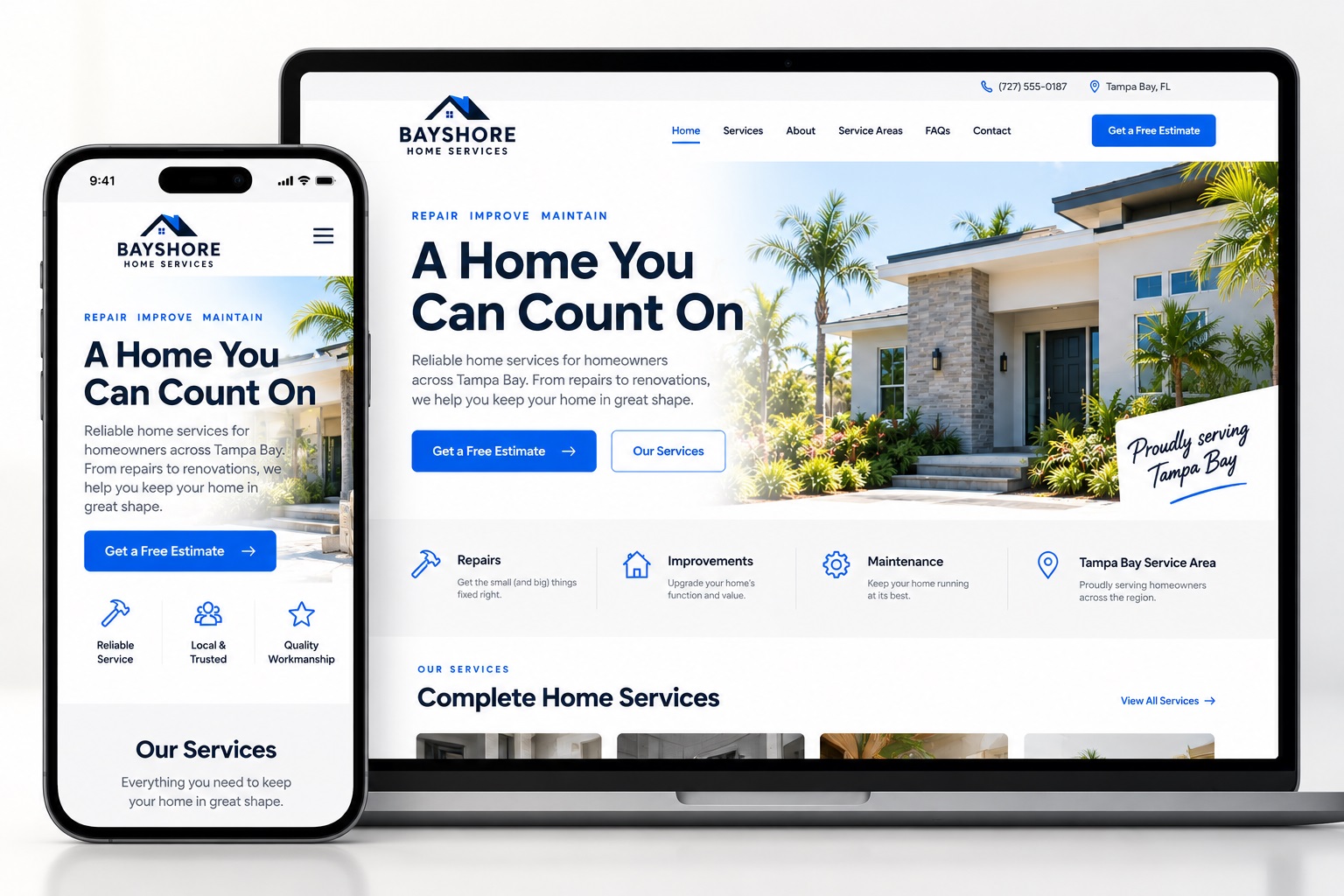
On mobile, the design should prioritize clarity: readable typography, usable navigation, sensible image crops and obvious ways to make contact.
Important information should not disappear simply because the visitor is using a phone.
Lead-Generation Support
The information should help move an interested visitor toward a conversation.
A website cannot guarantee leads. It can, however, remove unnecessary friction from the path a potential customer takes while evaluating a business.
Establish a useful digital presence that can be encountered through search, referrals and other channels.
Clearly explain the business, services, market and problems the company solves.
Give the visitor enough evidence and context to feel comfortable considering the company.
Make the next step easy once the visitor is ready to start a conversation.
Foundation + Additional Layers
The core website does not have to contain everything.
The core site should establish the business clearly. Additional content can then build more depth around it when that depth is useful.
Establish the business.
Who you are.
What you do.
Where you work.
Why customers should trust you.
How to take the next step.
Build more around it.
Customer questions.
Problems you solve.
Service context.
Decisions customers face.
Business expertise and useful explanations.
Website Checklist
Before calling the website complete, check the fundamentals.
- The business is clearly identified.
- The main services are easy to understand.
- Relevant service areas or geographic markets are clear.
- The website gives visitors credible reasons to trust the company.
- Contact information is accurate.
- Calls to action are clear without being excessive.
- The website works well on desktop, tablet and mobile.
- Text is readable and navigation is easy to use.
- Images support the business rather than merely filling space.
- Important pages use clear headings and logical structure.
- Search engines can access appropriate public pages.
- Analytics and search-monitoring tools are configured where appropriate.
- The site has room for future services, FAQs or useful content.
- Privacy, legal or industry-specific information is included where applicable.
- Forms, phone links and other conversion paths actually work.
A good website should leave a potential customer with fewer questions about the business—and a clearer idea of what to do next.
The Get Social Simple Approach
Build what the business needs. Leave out what it doesn’t.
Get Social Simple builds professional small-business websites around the information potential customers need to understand, evaluate and contact the company.
That includes professional presentation, clear services and geographic context, responsive design, lead paths, Google discovery setup, analytics and a structure capable of supporting useful content.
We do not believe every service, city or keyword automatically deserves its own page. The structure should be as large as it needs to be—and no larger.
Small Business Website FAQ
Common questions about what a business website needs.
What are the most important things to include on a small-business website?
A small-business website should clearly explain who the business is, what it does, where it operates, why a potential customer should trust it and how to make contact. The exact pages and features should support those core objectives.
Does every service need its own page?
No. A separate service page makes sense when the service deserves enough unique and useful information to support a substantial page. Closely related services may be clearer when consolidated rather than split across repetitive pages.
Does every city I serve need its own page?
No. Geographic information should be useful and accurate. Creating many substantially similar city pages can make a website repetitive. Separate location pages make more sense when there is enough genuinely distinct information and business relevance to support them.
Does a small business need an About page?
Often, yes. An About page can help potential customers understand the people, history, experience or philosophy behind the company. This is particularly useful for local service businesses where trust plays an important role in the decision.
Does a small-business website need a blog?
Not every business needs to publish frequently. Useful educational content can be valuable when the company has real customer questions, service expertise or information worth explaining. Publishing low-value articles simply to keep a blog active is not the objective.
What should be on a small-business homepage?
The homepage should quickly establish what the business does, provide relevant geographic context, introduce the most important services, communicate credibility and give visitors a clear path toward more information or contact. It does not need to contain every detail from the rest of the website.
Can a good website help a business generate leads?
A website can support lead generation by making the business easier to understand and trust and by making contact easier once a visitor is interested. It cannot guarantee leads because traffic, demand, competition and other factors also influence results.
What should a website include for Google and AI search?
Start with clear, accurate information about the business, its services, relevant geography and expertise, organized in a logical website structure. Useful customer-focused content can add more context over time. No particular structure guarantees Google rankings or AI citations.
Build the Right Foundation
Your website doesn’t need everything. It needs the right things working together.
Get Social Simple builds professional small-business websites around clear business information, credibility, modern search understanding and an easier path from interested visitor to potential lead.